



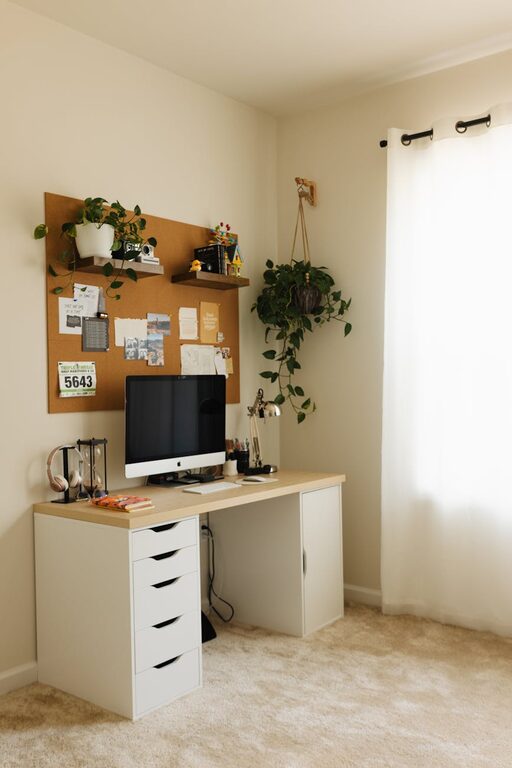
Creating a home workspace that is both cozy and productive can greatly enhance your work-from-home experience. Whether you’re freelancing, managing a remote team, or studying, a thoughtfully arranged workspace helps you stay focused and comfortable throughout the day. Here are practical tips to design a home office that welcomes productivity and relaxation in equal measure.
Choose the Right Location
Selecting the best spot in your home is the first step. Aim for a quiet area with minimal distractions. Ideally, this space will have:
– Good natural light to reduce eye strain and boost mood
– Ventilation to keep the air fresh
– Enough room for your desk, chair, and any additional equipment
If you don’t have a dedicated room, try to carve out a corner or use a room divider to separate your workspace from living areas, helping mentally separate work from leisure.
Invest in Comfortable, Ergonomic Furniture
Comfort is key for long working hours. Ergonomic furniture supports good posture, which prevents discomfort and fatigue.
– Desk: Choose one at a height that allows your forearms to rest parallel to the ground. Adjustable desks are great if you want to alternate between sitting and standing.
– Chair: Invest in a supportive chair with lumbar support and adjustable height. Your feet should rest flat on the floor.
– Accessories: Consider a footrest, keyboard tray, or monitor stands to avoid strain.
A comfortable setup encourages productivity and protects your physical health.
Optimize Lighting
Lighting affects your mood and concentration. Combine multiple sources for the best results:
– Natural Light: Position your desk near a window, but avoid direct glare on your screen.
– Task Lighting: Use an adjustable desk lamp for focused work, especially during evenings or cloudy days.
– Ambient Lighting: Soft overhead lighting provides a balanced environment without harsh shadows.
Good lighting reduces eye strain and keeps you energized.
Keep Your Workspace Organized
A clutter-free desk helps clear your mind and improve efficiency.
– Use storage solutions like shelves, filing cabinets, or desk organizers to keep essentials within reach but out of the way.
– Adopt a daily routine to tidy up your workspace at the end of each day.
– Keep cables managed with clips or sleeves to prevent messy tangles.
An organized space saves time and reduces stress.
Personalize Your Space
Adding personal touches makes your workspace inviting and boosts motivation:
– Hang inspiring artwork, photos, or motivational quotes on the wall.
– Incorporate plants to improve air quality and create a calming atmosphere.
– Choose decor items and colors that make you feel relaxed and happy.
Your workspace should reflect your personality while remaining functional.
Minimize Distractions
Distractions can disrupt your flow and reduce productivity.
– Use noise-cancelling headphones or a white noise machine if ambient noise is an issue.
– Keep your phone on silent or in another room during focused work periods.
– Use apps or browser extensions that limit social media or distracting websites.
Creating boundaries between work and leisure time is essential for focus.
Maintain Good Air Quality and Temperature
A comfortable environment helps maintain focus and health.
– Open windows regularly to circulate fresh air.
– Use an air purifier if indoor air quality is poor.
– Keep the room temperature between 68°F and 72°F (20°C to 22°C) for optimal comfort.
Adjust your workspace to prevent discomfort that can lead to distraction.
Establish Work-Life Boundaries
Having a cozy and productive workspace is also about managing your day effectively.
– Set specific work hours and stick to them.
– Take regular breaks to stretch, hydrate, and rest your eyes. The Pomodoro technique (25 minutes of work followed by a 5-minute break) can be helpful.
– Avoid work tasks in other parts of the home to maintain mental boundaries.
Balance is crucial for long-term productivity and well-being.
Use Technology Wisely
Equip your workspace with the right tech tools that support your workflow:
– A reliable computer and high-speed internet connection are fundamental.
– Use cloud storage services to access files from anywhere and back them up.
– Consider noise-cancelling headphones for calls and concentration.
Stay updated on software that may improve your productivity with task management and communication.
—
Setting up a cozy and productive home workspace takes time and thought, but the benefits are well worth it. By focusing on comfort, organization, personalization, and clear boundaries, you can create an environment that supports your best work every day. Start small and adjust your space as you discover what helps you focus and feel at ease. Happy working!


More Stories
Tips for Creating a Relaxing Home Workspace to Boost Productivity
Tips for Creating a Cozy and Productive Home Office Space
Tips for Creating a Cozy and Inviting Home Office Space